Kissi (Kisi) Language Keyboard
Download the keyboard that Translation Commons created for the Kissi/Kisi Language for the Windows and Android platforms.
- This keyboard supports the Kissi/Kisi language in the Latin script for Southern Kissi in Sierra Leone and Liberia.
- The ISO code for this language is kss.
- This Kissi/Kisi language keyboard is version 1.0 and was released 2024-07-17.
How to use the Kissi Keyboard
This keyboard was tested on Windows and Android operating systems, as well as Mobile Web. It may also work on macOS, iOS and Linux but this is not verified.
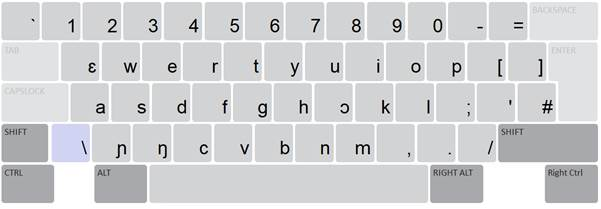
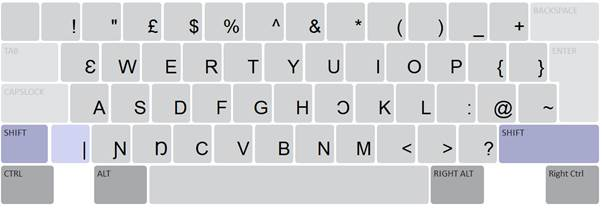
The keyboard is based on a QWERTY layout with modifications. The following characters were included in the base layer: ɲ, ɔ, ɛ, ŋ and the upper case versions in the shift layer: Ɲ, Ɔ, Ɛ, Ŋ
Additional comments for desktop/mobile web:
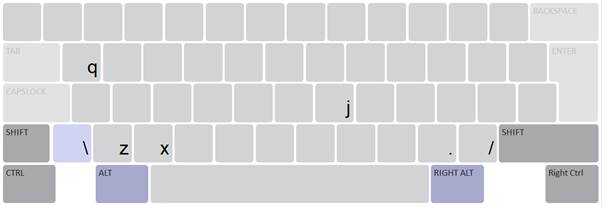
The following characters can be found in the Alt layer: q, z, x, j
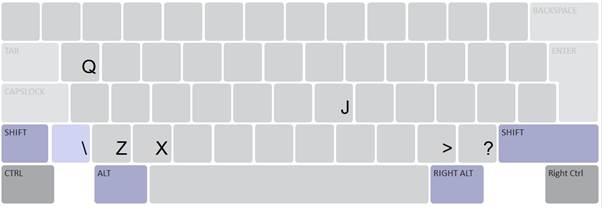
The following characters can be found in the Shift Alt layer: Q, Z, X, J
Accented characters are produced by first pressing the diacritic key, followed by the character to be accented. The following characters can have a diacritic added to them: a, e, i, o, u, ɛ, ɔ, ɲ, ŋ, A, E, I, O, U, Ɲ, Ɔ, Ɛ, Ŋ
The following can be added:
/ – Macron
[ – Grave] – Acute
If you want to type the literal characters /, [, or ], enter them twice.
The below is the visual representation of the Kissi keyboard for desktop, version 1.0
Main layer
Shift layer
Alt layer
Alt + Shift layer
Notes for tablet/phone
The following characters can be found in the long-press: q (long-press ɛ), z (long-press ɲ), x (long-press ŋ́), j (long-press ɔ)
The following characters can be found in the Shift Alt layer: Q (long-press Ɛ), Z (long-press Ɲ), X (long-press Ŋ), J (long-press Ɔ)
Accented characters are available when using long-press on the respective base character. For example, “à” is available when pressing and holding “a”.
Acknowledgements
This keyboard is developed through Translation Commons’ Language Digitization Initiative. These resources aim to empower Indigenous and minority language communities to bring their languages online.
If your community would like assistance with digitizing your language, contact [email protected] or visit TranslationCommons.org.
Translation Commons thanks its many volunteers who contributed their expertise and significant time to produce this keyboard. The author of the Kissi Keyboard is Tabea De Wille, in collaboration with the Mano River Sustainable Development Association Pty Ltd (MaRSDA): https://marsda.org/
This keyboard supports Southern Kissi (Sierra Leone and Liberia).
Reporting Problems
If you have any problems or suggestions, please report them by e-mail to [email protected] or using this keyboard feedback form.